I have a very large table where the columns and rows are named, and interior cells are "1" or empty (essentially a sparse matrix). I have rotated the column header text direction up so that the columns may be narrow. Here is a simplified example:
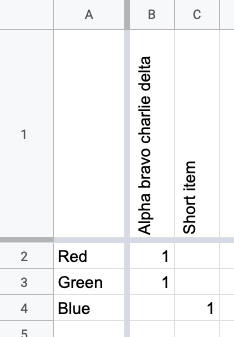
Some column names are very long, so the cells cannot be the entire height of the column names. When I resize the column name row to be smaller height, the text is clipped in the wrong direction. Prefixes of the names are incorrectly cut off instead of suffixes as desired. See cell B1 in simplified example of the problem:
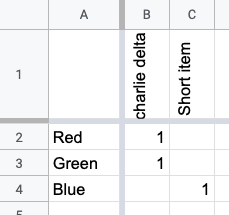
How can I change the direction that text clipping occurs?


