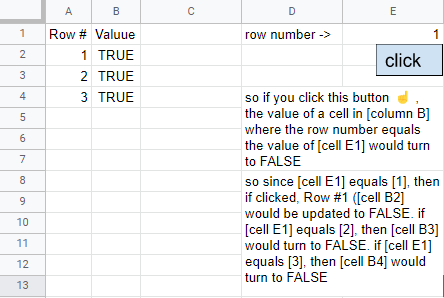
Suppose I have a table, like so A | B | E |1 Row | Value | 1 | [click here]2 1 | FALSE |3 2 | FALSE |4 3 | FALSE |I wish to create a button.When clicked, it reads the value of cell E1, in this example is 1.Then it changes the value of row number 1 (the value of E1), in this case cell A2, to FALSE.If the value of E1 is 2, when clicked, it will change the value of cell A3 to FALSE.If the value of E1 is 3, when clicked, it will change the value of cell A4 to FALSE.And so on.
I still have no Idea how to start with the app script. Any help will be appreciated.