I'm using banding to highlight some areas, with a section in between with a fixed colour. It should look like this.
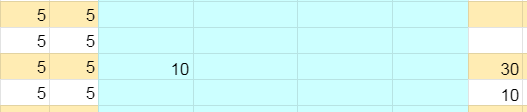
Sometimes, when I enter a number in the blue area in the middle, the banding appears:

I have no idea why this happens. I keep re-applying a fixed colour to those cells, using a macro, but sometimes the banding just keeps coming back.
Any ideas?
Here is an editable document that shows the problem, putting a value in F3 re-introduces the banding in that section, but putting a value in F9 does not. I'm a bit baffled why the problem only affects column F as well, not E or G.
The cells that are pale blue should stay pale blue, and not pick up the orange and white colour banding when values are entered.
https://docs.google.com/spreadsheets/d/17zRq27A6_ow56WNfbidGL07hTrbXc4i4Oco-auTictQ/edit?usp=sharing
Here's another document that is not editable, in case someone messes up the first, request access and I will grant it, or save a copy in your Google Drive account.
https://docs.google.com/spreadsheets/d/1sFbm91dUQ0xJ4CpCnWD-DLw5qLR2RXdUCmON1_ayHmk/edit?usp=sharing
Both documents have a menu (takes a minute to appear) with macros that re-apply the colour scheme as it should be. Running the "Apply Bands" removes the problem but messes up the colour, so advice on how to fix that would also be appreciated!